UNM Canvas Support
Help is available when you have questions about Canvas. Use the information below to find the right contact, or visit the UNM Canvas Student Help Resources for instructions and tutorials.
Who Should I Contact?
- Your instructor: Questions about assignment instructions, deadlines, grades, feedback, or course expectations.
- Canvas Support: Technical problems using Canvas, accessing course content, or submitting work.
- UNM IT Service Desk: Help with your NetID, password, LoboMail, or other university services. Call 505-277-5757 or open an IT support ticket.
Get Canvas Support
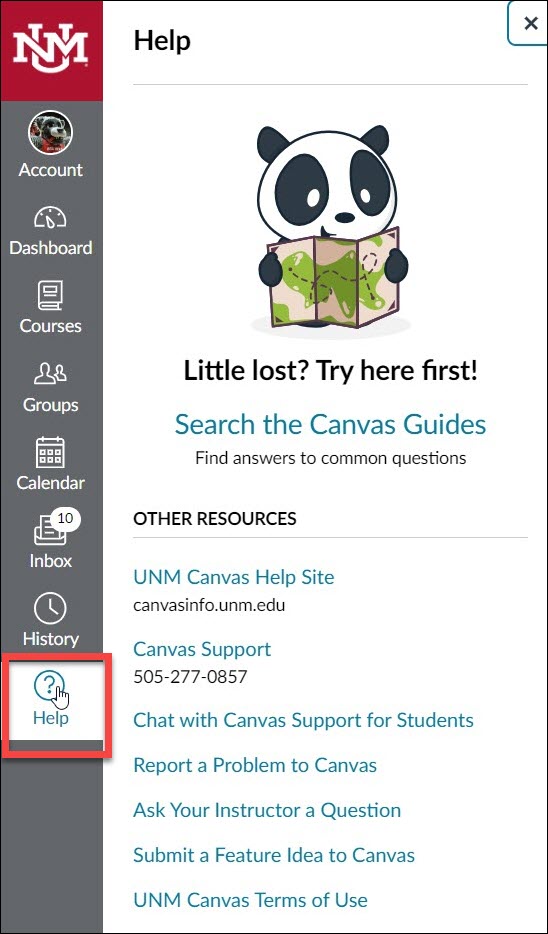
In Canvas, select Help in the Global Navigation menu to find support options.
24/7 Phone Support
- Albuquerque: 505-277-0857
- Toll-free: 1-877-688-8817
24/7 Chat and Problem Reporting
Open the Canvas Help menu and select Chat with Canvas Support for Student to chat with a support agent, or Report a Problem to submit a ticket.
For additional contact options, visit UNM Canvas Support.
What to Include When Asking for Help
- Your course name and section.
- The assignment, quiz, or page where the problem occurred.
- What you were trying to do and what happened.
- The error message, if any, and when the problem occurred.
- The device and browser or app you were using.
If a technical problem affects a deadline or test, also notify your instructor promptly.